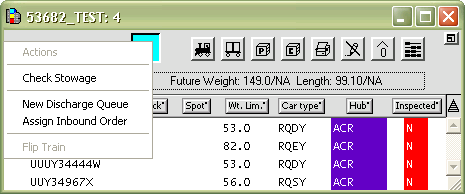
The Actions drop-down list in the XPS client Train window contains commands for working with inbound or outbound trains, based on what kind of train is open.
Inbound commands
Check Stowage - Check for stowage violations (VCG, Weight, and Height).
New Discharge Queue – Create a new discharge work queue for the open inbound train.
Assign Inbound Order – Assign an order to the railcars displaying in the train window. The inbound order must match the actual order of the cars as they are arranged on the arriving train.
Flip Train - Change the train's orientation in graphical views, for instance, to reflect how the train is positioned on the tracks. The end railcar becomes the first railcar on the train. You can set car orientation for each railcar independently. When you flip an entire train, the orientation of each railcar is reversed.
To flip a train, you must have the XPS privilege TRNFLP (on page 1).
If you plan containers from a railcar, you cannot delete the railcar unless all the planned moves are completed or reverted.
For the commands in the Actions drop-down list for outbound trains, see Actions drop-down list: outbound Train window (on page 1).